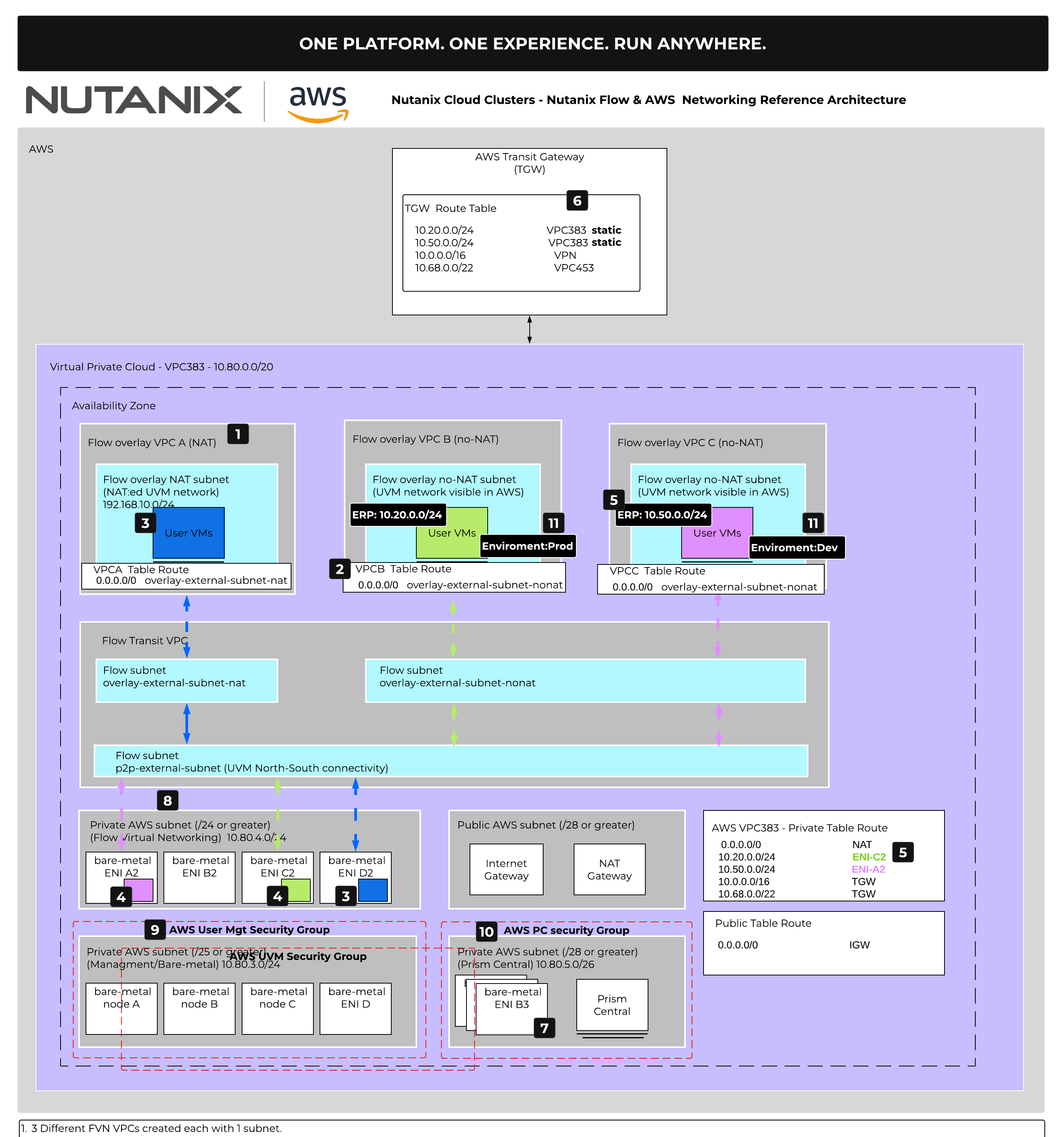
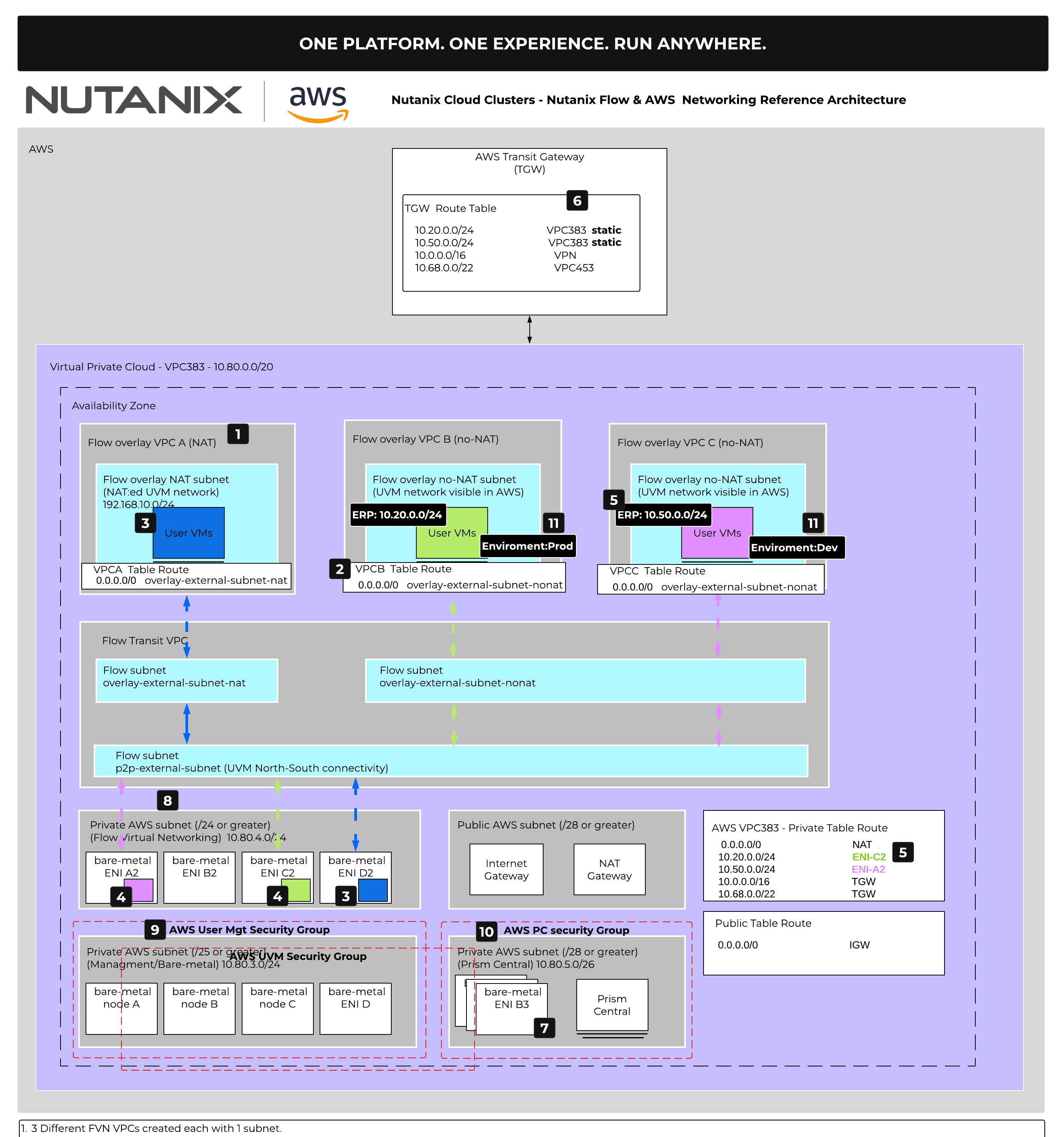
Nutanix Cloud Clusters (NC2) on AWS pair AWS networking primitives with a Nutanix Flow Virtual Networking (FVN) software-defined overlay, and the reference diagram shows exactly how packets move between the two. The walkthrough below follows the diagram callouts one through eleven. Read each numbered section alongside the matching number on the diagram, and the full traffic path will come into focus.
1. Three FVN VPCs, One Subnet Each
The cluster hosts three FVN VPCs, each with a single subnet. VPCA runs in NAT mode for egress. VPCB and VPCC both run in no-NAT mode. FVN is the software-defined overlay where your user VMs (UVMs) live, logically separate from the AWS VPC the cluster sits in.
2. Default Routes on Each FVN VPC
Every FVN VPC has a default route that decides how its traffic exits the overlay. VPCA’s default points to a NAT subnet. VPCB and VPCC each default to a no-NAT subnet. Same overlay building blocks, two different egress models.
3. Inside VPCA (NAT)
The NAT in VPCA uses an IP from the FVN subnet (10.80.4.0/24 in the diagram). An ENI (the AWS elastic network interface) tied to a bare-metal host acts as the VPC gateway, the component that bridges the FVN overlay to AWS. Because FVN IPs are fully routable inside AWS, you can also assign one as a floating IP to a VM in VPCA. Services outside the overlay can then reach that VM directly through the floating IP, no load balancer required.
4. Inside VPCB and VPCC (No-NAT)
No-NAT overlays leave VM source addresses intact on the way out. If a host has no current VPC gateway running on it, FVN selects a node from the bare-metal cluster and uses the FVN subnet ENI on that node as the VPC gateway. A single VPC gateway can host multiple FVN overlays at the same time, so you do not need a dedicated host per overlay.
5. ERPs Advertise the Overlay into AWS
An ERP (External Routable Prefix) is the CIDR an FVN overlay exposes to the underlying AWS VPC. When you configure an ERP for an overlay, FVN updates the AWS VPC’s private route table so that CIDR points at the ENI hosting the VPC gateway. From that moment on, any AWS resource sitting in the same VPC can reach the overlay using standard AWS routing.
6. Transit Gateway for Traffic Leaving the AWS VPC
The ERP only reaches inside one AWS VPC. To go further, attach an AWS Transit Gateway (TGW) and add a static route for the ERP CIDR pointing at the cluster’s AWS VPC (VPC383 in the diagram). With that route in place, TGW unlocks reachability to other AWS VPCs, a site-to-site VPN back to a private datacenter, or AWS Direct Connect.
7. Prism Central on a Native AWS Subnet
Prism Central (PC) runs as three VMs for HA on a native AWS subnet rather than an FVN overlay. Each bare-metal node hosting a PC VM consumes an ENI dedicated to PC, and PC uses secondary IPs on that ENI for its addresses. PC is therefore reachable through normal AWS routing, with no ERP required.
8. UVM Security Group
AWS security groups land with the cluster and attach automatically to the bare-metal ENIs. The UVM security group governs all north and south traffic to the FVN user VPCs, so this is your perimeter control for everything happening on the overlays.
9. User Mgt Security Group
The User Mgt security group protects AHV (the Nutanix hypervisor) and the CVMs (Controller VMs, the Nutanix storage controllers). It is the guardrail around the cluster’s control and data plane.
10. PC Security Group
The PC security group protects Prism Central. Together with the UVM and User Mgt groups, it gives you three pre-built perimeters covering user workloads, cluster management, and the management plane.
11. FNS Microsegmentation for East-West
Flow Network Security (FNS) is the software-defined east-west control inside the cluster, built directly into AHV at the hypervisor level. Policies use categories, key:value labels like Environment:Prod or Environment:Dev, so they follow the workload wherever it moves rather than chasing IP addresses. Application, isolation, and quarantine policies are all available out of the box.
Putting It Together
Overlay to VPC gateway, VPC gateway to ENI, ENI into the AWS VPC route table via the ERP, and on to the wider world through Transit Gateway. Security groups guard the perimeter, FNS guards inside the cluster. Once you walk the diagram a couple of times, FVN traffic flow on AWS becomes second nature.
Frequently Asked Questions
Q: What is Nutanix Flow Virtual Networking (FVN)?
Flow Virtual Networking is a software-defined networking layer that runs on top of Nutanix Cloud Clusters (NC2). On AWS, it gives your user VMs the same overlay model you would expect on-prem: multiple isolated FVN VPCs, your choice of egress mode, floating IPs, and built-in routing. FVN lives in software on the cluster, independent of the underlying AWS VPC.
Q: What is the difference between a NAT and no-NAT overlay in FVN?
A NAT overlay translates VM addresses to an IP from the FVN subnet on the way out, similar to how a home router behaves. A no-NAT overlay leaves the VM source address intact, so the rest of AWS sees the real overlay IP. NAT is the default for simple egress, while no-NAT is the right choice when you want full bidirectional reachability or when downstream systems need to see the original VM IP.
Q: What is an External Routable Prefix (ERP) in FVN?
An ERP is the CIDR that an FVN overlay advertises into the surrounding AWS VPC. When you configure an ERP, FVN updates the AWS VPC private route table so that CIDR points at the ENI hosting the FVN VPC gateway. From that point on, any AWS resource inside the same VPC can reach the overlay using normal AWS routing.
Q: How does FVN traffic actually leave the AWS VPC?
Traffic exits the overlay through the FVN VPC gateway onto an ENI in the AWS subnet. To go beyond that single AWS VPC, you attach the VPC to an AWS Transit Gateway and add a static route for the ERP CIDR pointing at the cluster’s AWS VPC. The Transit Gateway then carries traffic to other VPCs, a site-to-site VPN, or Direct Connect.
Q: How is Flow Virtual Networking different from a standard AWS VPC?
A standard AWS VPC is provisioned and managed in AWS, with subnets, route tables, and ENIs as the primary building blocks. FVN sits on top of that and gives you a Nutanix-native overlay with its own VPCs, subnets, and routing logic. You still use AWS networking underneath, but workloads see the FVN model, which makes hybrid operations and lift-and-shift much more consistent.
Q: What role does Flow Network Security (FNS) play on NC2?
Flow Network Security handles east-west microsegmentation inside the AHV hypervisor. Policies are written against VM categories such as Environment:Prod rather than IP addresses, so they follow the workload wherever it moves. FNS complements FVN: FVN moves the packets, FNS decides which packets are allowed to move.
Q: Is the FVN VPC gateway highly available?
Yes. The VPC gateway is hosted on a node in the bare-metal cluster, and FVN handles placement and failover automatically. If the node hosting a gateway becomes unavailable, FVN selects another node and rebuilds the gateway there, updating the AWS route table to point the ERP at the new ENI. A single gateway can also host multiple FVN overlays, so you do not need a dedicated host per overlay.
Try It Yourself
- Test Drive NC2 on AWS. Get hands-on in a guided sandbox, no AWS account required: https://www.nutanix.com/products/cloud-clusters/aws
[VERIFY URL] - Go deeper with TN-2028. The full NC2 on AWS technical note covers architecture, networking, and operations end to end: https://portal.nutanix.com/page/documents/solutions/details?targetId=TN-2028-Nutanix-Cloud-Clusters-on-AWS:TN-2028-Nutanix-Cloud-Clusters-on-AWS
[VERIFY URL]
LinkedIn Post (for sharing)
Most people setting up NC2 on AWS get stuck at the same place: how does traffic actually leave the overlay?
The short answer is that Nutanix Flow Virtual Networking gives you a software-defined overlay on top of AWS, with its own VPCs, subnets, and routing. The longer answer involves three terms worth knowing: the FVN VPC gateway, the ENI it pins to, and the External Routable Prefix (ERP) that advertises your overlay CIDR into the AWS route table.
Once you understand how those three pieces work together, the whole NAT vs no-NAT decision gets easier, and Transit Gateway routing to other VPCs, VPN, or Direct Connect becomes conventional AWS networking. You also get Flow Network Security riding alongside for east-west microsegmentation, with policies tied to VM categories instead of IPs.
I put together a walkthrough of the full traffic path, with a reference diagram and an FAQ for the questions that come up most often.
If you run NC2 on AWS or are evaluating it, this one is for you.
[BLOG URL]
#Nutanix #NC2 #AWS #HybridCloud #FlowNetworking